A free WGestures alternative for everyday gestures
Directional strokes, selected-text search, Lua, hot corners and action menus all have counterparts in Mousetroke. Get free MIT source, explicit Windows 11 support and a modern settings UI in 10 languages.
Mac support is in active development, with a beta available now.
Everyday WGestures features in Mousetroke
- Directional strokes (WGestures 1/2)
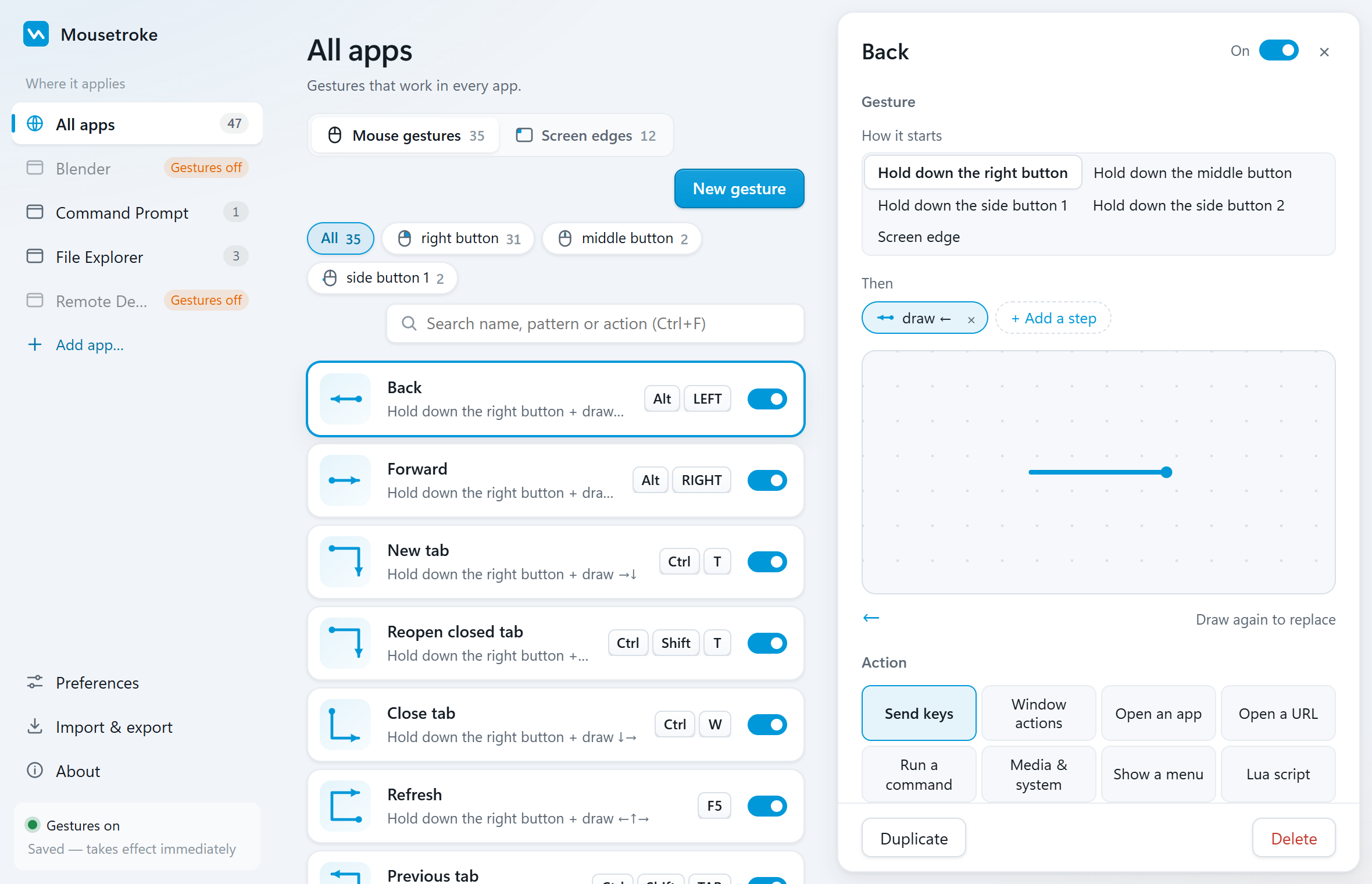
- Hold right, middle or X1/X2 and draw directions; record strokes directly in settings.
- Per-app settings / skip global rules (WGestures 1)
- Use Pick a window, add app-specific strokes, turn off Use global gestures too, or disable gestures for that app.
- Lua (WGestures 1; WGestures 2 on Windows)
- Choose a Lua script action on Windows or Mac beta; rewrite scripts for the Mousetroke API.
- Command line / Cmd (WGestures 1/2 on Windows)
- Choose Run command, or use dedicated Launch app and Open URL actions.
- Key sequences (WGestures 1/2)
- Configure shortcuts, key sequences and delays in Send keys.
- Selected-text web search (WGestures 1/2)
- Use the built-in search stroke, or insert %MS_SELECTED_TEXT% into an Open URL action.
- Hot corners (WGestures 1/2)
- Bind actions to screen corners, with edge wheel or click triggers too.
- Edge rubbing (WGestures 1)
- Add an edge-rub trigger; the Windows default rubs the right edge to open Task Manager.
- Custom / pinned menus (WGestures 2)
- Group actions in a Popup menu beside the pointer; it does not stay pinned on screen.
- Gesture search and management (WGestures 2)
- Ctrl+F searches names, strokes and actions; filter, duplicate and import/export configs. Imports can replace or merge.
More with Mousetroke
- Free including business use, with MIT source and no ads, account or telemetry.
- Actively maintained: v0.2.0 (Mac beta) and v0.2.1 both shipped on 2026-10-20.
- Explicit Windows 10 1809+/11 x64 support; a macOS 11+ universal build native on Apple silicon and Intel.
- A modern settings UI in 10 languages, plus one-click in-app updates on Windows and Mac beta.
Currently unavailable: animated stroke replay and native AppleScript actions. The Mac beta offers Lua and Run command actions.
Compare the facts
| Feature | Mousetroke | WGestures 1 | WGestures 2 |
|---|---|---|---|
| Platforms | Windows 10 1809+/11 x64; macOS 11+ (Apple silicon & Intel, beta) | Windows 7+; README lists 7/8/10 | Windows 10 1607+; macOS 10.15+ |
| Price, business use & license | Free for everyone, including business use; MIT open source; no ads, account or telemetry | Free, GPL-2.0 open source | Commercial: site lists RMB 36.99 per activation code, up to 4 computers at once (as of 2026-10-21) |
| Maintenance / latest release | v0.2.1 · 2026-10-20 | Site: 1.8.5.0 · 2022-01-01 | Site: Windows 2.9.1 · 2023-05-03; macOS 2.3.3 · 2021-12-12 |
| System-wide or browser-only | System-wide; per-app rules and exclusions | System-wide mouse gestures; per-app settings can opt out of global gestures | System-wide mouse gestures; per-app trigger inheritance and overrides |
| Scripting & actions | Lua; 8 action types: send keys, window actions, open an app, open a URL, run a command, media & system, show a menu, Lua script | Lua, command-line actions, key sequences and web search for selected text | Windows: Cmd and Lua; macOS: AppleScript; custom menus |
| Screen corners & edges | Hot corners; edge wheel, click and rub actions; Windows brightness supports DDC/CI external monitors | Hot corners and edge rubbing | Corner/edge bumping, clicking, scrolling, drawing and sliding |
| Touchpad & touchscreen | Right/middle/X1/X2 mouse-button strokes; no native multi-finger touch gestures | — | — |
| Installation | Windows: 13.2 MB portable exe, settings use system WebView2; Mac beta: 8.1 MB DMG | Installer ZIP from official site; 1.8.5.0 uses .NET 4.8 | — |
| In-app updates | One-click updates on Windows and Mac; Mac support since v0.2.1 | — | — |
| Settings languages | Settings in 10 languages | — | — |
| Gesture search & management | Search by name/stroke/action; button/position filters; duplicate; config import/export; replace or merge on import | — | Gesture search, animated replay and drag-and-drop copying |
Based on the official sites, checked 2026-10-21. "—" = not stated there.
Choose for your needs
Choose Mousetroke if…
- Keep directional strokes, Lua, commands, key sequences, hot corners and edge rubbing.
- Search names, strokes or actions; filter by button/position, duplicate and import/export.
- Free for everyone, including business use; MIT source, no ads, account or telemetry.
- Windows 11 and a native Apple silicon / Intel Mac beta, with one-click updates on both.
When WGestures 1 / WGestures 2 fits better
WGestures 2 fits workflows centered on native AppleScript actions or menus pinned on screen.
Differences in daily use
Moving to Mousetroke keeps directional strokes, per-app rules, Lua, commands and selected-text search within reach. Use Ctrl+F to find names, strokes or actions. Configure right, middle and side buttons separately, see the gesture name while drawing and keep a normal right-click menu. Settings come in 10 languages; changes apply in about a second.
WGestures 1 offers free GPL-2.0 source, Lua, hot corners and edge rubbing; its latest site log is dated 2022-01-01. WGestures 2 lists an activation code at RMB 36.99, with search, animated replay and pinnable custom menus. Its latest site logs are dated 2023-05-03 for Windows and 2021-12-12 for macOS. These dates describe the records shown on the site.
Rebuild Back, Close Tab and window actions first, then add app rules with Pick a window. Use a popup menu for a group of actions and rewrite custom logic in Lua. Test each task before adding the rest of your screen-edge actions.
Frequently asked questions
What is a good WGestures alternative for Windows 11?
Mousetroke. It explicitly supports Windows 11, has counterparts for directional strokes, Lua, per-app rules and screen edges, and offers free MIT source with settings in 10 languages.
Do Mousetroke's Lua and menus cost extra?
No. Lua and popup menus are free for everyone, including business use. WGestures 1 is free GPL-2.0 software; WGestures 2 lists an activation code at RMB 36.99 and does not state an open-source license on its site.
How does Mousetroke manage a large gesture library?
Use Ctrl+F to search by name, stroke or action, then filter by button or edge position. Duplicate gestures and import/export configurations; Imports can replace or merge. The Mac beta uses ⌘+F for search.
Does the Mousetroke Mac beta support Apple silicon and in-app updates?
Yes. Its macOS 11+ universal build runs natively on Apple silicon and Intel. Since v0.2.1, About offers one-click updates. Windows also supports in-app updates.
Start with one everyday gesture
Go back, close a tab, manage a window or trigger an action from a screen corner. About 19 MB resident on Windows and 13 MB on Mac.
Unsigned Windows exe: SmartScreen may appear on first run (More info → Run anyway). Mac beta: if first open is blocked, use Privacy & Security → Open Anyway, then follow setup.
Sources
Sources: the WGestures 1 and WGestures 2 official sites and the Mousetroke changelog. Last checked .