Leaving StrokesPlus.net? Set up everyday gestures in Mousetroke
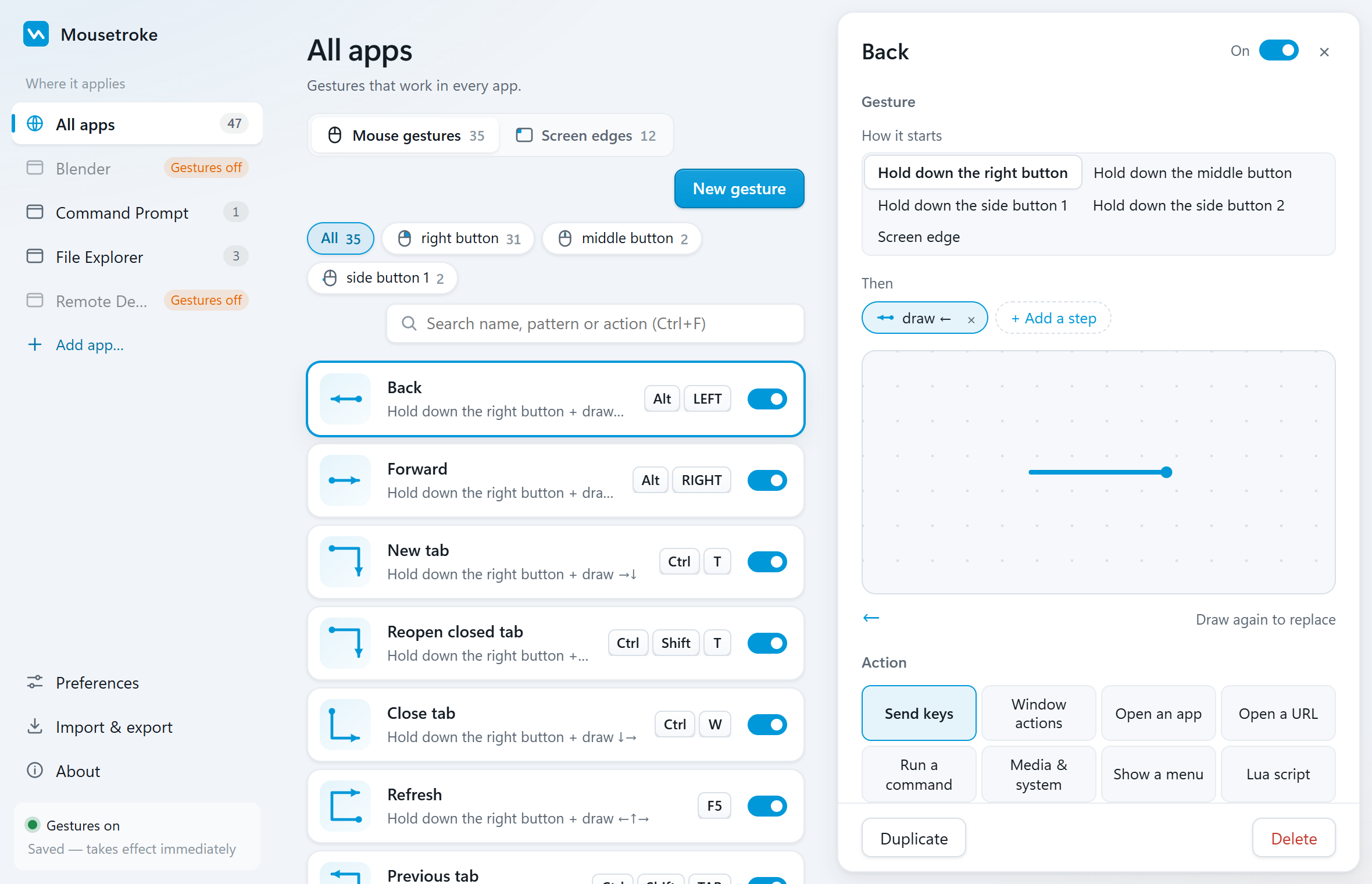
Rebuilding your gesture setup? Mousetroke gets everyday actions going with about 50 editable built-in gestures, direct action settings, Lua and screen corners. The app is free and its source is MIT-licensed.
Mac support is in active development, with a beta available now.
Compare the facts
| Feature | Mousetroke | StrokesPlus.net | Input.Observer |
|---|---|---|---|
| Platforms | Windows 10 1809+/11 x64; macOS 11+ (Apple silicon & Intel, beta) | Windows | Windows 10 1809+/11 x64; Windows ARM unsupported |
| Price, business use & license | Free for everyone, including business use; MIT open source; no ads, account or telemetry | — | One-time personal license for 1.x; full 30-day trial, free keys for eligible former community members (as of 2026-10-21) |
| Maintenance / latest release | v0.2.1 · 2026-10-20 | Original site archives forums and final downloads; author moved to Input.Observer | 1.2.0 · 2026-10-20 |
| System-wide or browser-only | System-wide; per-app rules and exclusions | Mouse gestures and hotkeys across Windows apps | Global and per-app gestures, hotkeys and text expansion |
| Scripting & actions | Lua; 8 action types: send keys, window actions, open an app, open a URL, run a command, media & system, show a menu, Lua script | JavaScript (V8); scripts do not run unchanged in its successor | C-like scripts, no-code steps, macro recorder, completion and inline help; AutoHotkey v2 handoff |
| Screen corners & edges | Hot corners; edge wheel, click and rub actions; Windows brightness supports DDC/CI external monitors | — | — |
| Touchpad & touchscreen | Right/middle/X1/X2 mouse-button strokes; no native multi-finger touch gestures | — | — |
| Installation | Windows: 13.2 MB portable exe, settings use system WebView2; Mac beta: 8.1 MB DMG | — | x64 installer; Microsoft Store option |
Based on the official sites, checked 2026-10-21. "—" = not stated there.
Choose for your needs
Choose Mousetroke if…
- Free for everyone with MIT source; no account, ads or telemetry.
- Mouse strokes, Lua and screen edges on Windows 11 and Mac beta.
- Edit about 50 built-in gestures or record your own by drawing.
- Eight action types and per-app rules: set up daily tasks, then add custom logic.
When StrokesPlus.net / Input.Observer fits better
If your core need is macro recording, text expansion and a script IDE with completion, paid Input.Observer offers those features and a 30-day trial.
Differences in daily use
Moving to Mousetroke lets you rebuild shortcuts, window tasks, app launches and selected-text search with built-in gestures and eight action types, then add Lua logic. Windows and Mac beta both offer screen corners and per-app rules; changes apply in about a second. Free access and MIT source keep everyday configuration and custom scripts available to everyone.
The StrokesPlus.net site now archives its forums and final downloads. Its author moved to Input.Observer, with macro recording, text expansion, no-code steps and script completion. It is Windows x64 only, with a one-time license and a 30-day trial. Old JavaScript scripts do not run as-is in Input.Observer.
Since scripts need adjustment, rebuild your three to five most-used tasks in Mousetroke first. Use key, window or Open URL actions where they fit, then rewrite remaining logic in Lua. This comparison makes no promise of direct imports or old-script compatibility.
Frequently asked questions
What is a good StrokesPlus.net alternative for Windows 11?
Mousetroke. It is free and MIT-licensed, includes about 50 editable gestures, and supports Lua, screen corners and per-app rules for rebuilding everyday actions.
Can I use Lua in Mousetroke on Windows and Mac?
Yes. Both have Lua actions, mouse strokes and screen edges. The Mac beta supports macOS 11+ with a universal build for Apple silicon and Intel.
How do I move StrokesPlus.net scripts to Mousetroke?
List each action's intended result, rebuild it with built-in key or window actions where possible, then rewrite necessary logic in Mousetroke Lua. Old JavaScript cannot run directly as Lua. Test each task before moving the rest.
Start with one everyday gesture
Go back, close a tab, manage a window or trigger an action from a screen corner. About 19 MB resident on Windows and 13 MB on Mac.
Unsigned Windows exe: SmartScreen may appear on first run (More info → Run anyway). Mac beta: if first open is blocked, use Privacy & Security → Open Anyway, then follow setup.
Sources
Sources: the StrokesPlus.net and Input.Observer official sites and the Mousetroke changelog. Last checked .