Use a mouse? Get gestures and corners with Mousetroke
Mousetroke focuses on strokes drawn while holding a mouse button: a portable 13.2 MB Windows exe with shape gestures, per-app rules and screen corners. No .NET install is needed; settings use system WebView2.
Mac support is in active development, with a beta available now.
Compare the facts
| Feature | Mousetroke | GestureSign | GestureSignv2 |
|---|---|---|---|
| Platforms | Windows 10 1809+/11 x64; macOS 11+ (Apple silicon & Intel, beta) | Windows tablets | Windows 11 focused; x64 and ARM64 |
| Price, business use & license | Free for everyone, including business use; MIT open source; no ads, account or telemetry | GPL-2.0 open source | GPL-2.0 open source |
| Maintenance / latest release | v0.2.1 · 2026-10-20 | v8.1 · 2022-02-03 | v18.4.1 · 2026-10-20 |
| System-wide or browser-only | System-wide; per-app rules and exclusions | Windows window control, keyboard simulation and program actions | Per-app gesture and command management |
| Scripting & actions | Lua; 8 action types: send keys, window actions, open an app, open a URL, run a command, media & system, show a menu, Lua script | Run commands/programs and built-in actions | — |
| Screen corners & edges | Hot corners; edge wheel, click and rub actions; Windows brightness supports DDC/CI external monitors | — | — |
| Touchpad & touchscreen | Right/middle/X1/X2 mouse-button strokes; no native multi-finger touch gestures | Touchscreen gestures with fingers; mouse input | Touchpad, touchscreen and mouse; TipTap and touch edge interactions |
| Installation | Windows: 13.2 MB portable exe, settings use system WebView2; Mac beta: 8.1 MB DMG | — | MSI or portable ZIP; matching .NET 10 and Windows App Runtime required |
Based on the official sites, checked 2026-10-21. "—" = not stated there.
Choose for your needs
Choose Mousetroke if…
- One portable Windows exe, without .NET 10 or Windows App Runtime requirements.
- Directional and shape gestures on right, middle and X1/X2 buttons.
- Screen corners plus per-app rules, with Pick a window to add apps.
- MIT source and free business use, plus a native Apple silicon / Intel Mac beta.
When GestureSign / GestureSignv2 fits better
If your core need is multi-finger touchpad, touchscreen or TipTap input, GestureSignv2 explicitly provides those inputs.
Differences in daily use
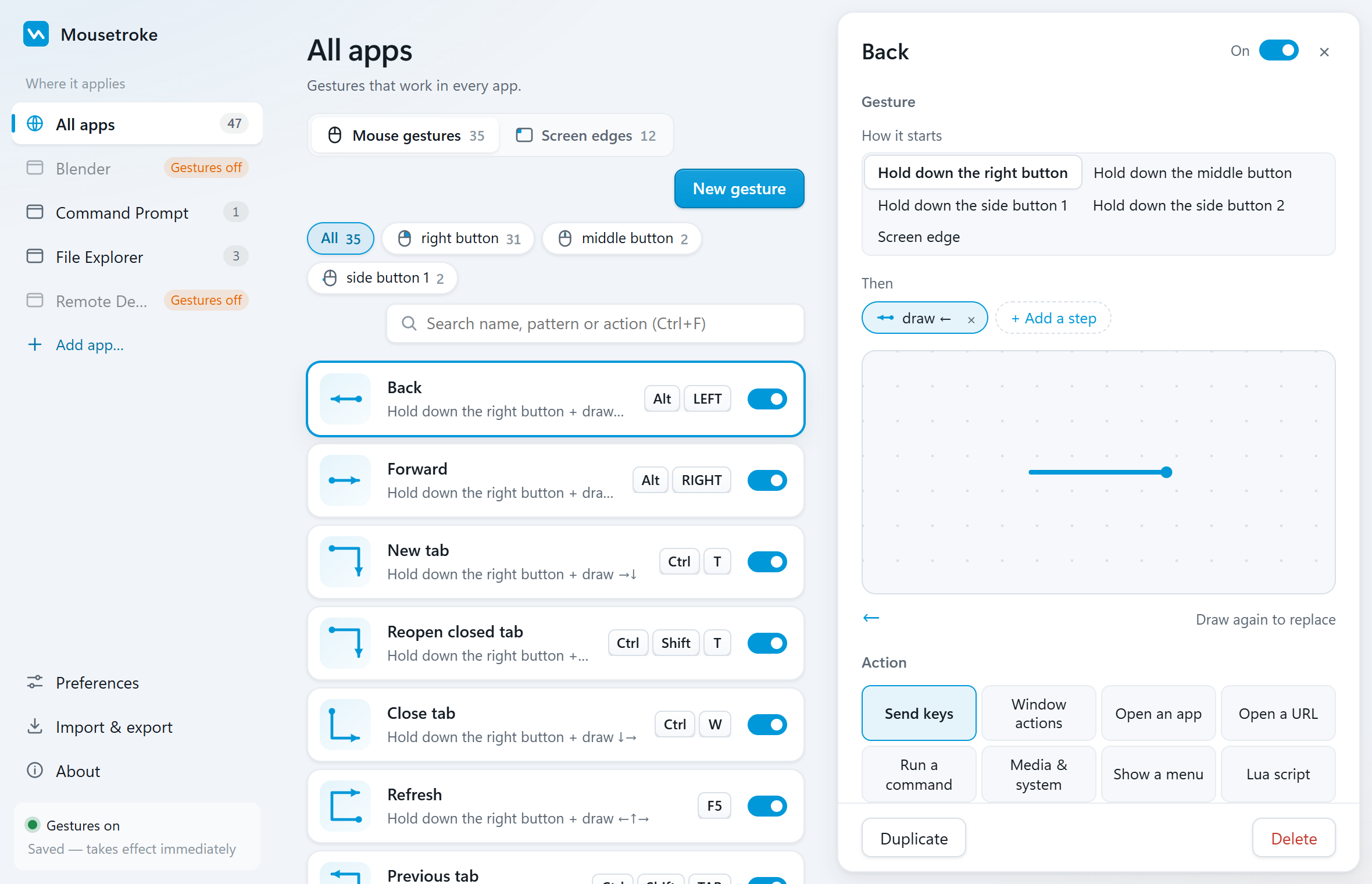
Moving to Mousetroke lets mouse users edit built-in strokes or record directions and shapes, then add left-click, wheel or keyboard modifiers. Corners trigger actions and per-app rules adjust or disable conflicting bindings. Windows uses a portable exe and system WebView2 for settings; no separate .NET or Windows App Runtime installation is needed.
GestureSign targets Windows tablets with touchscreen and mouse input; v8.1 was released on 2022-02-03. The community GestureSignv2 project targets Windows 11 with touchpad, touchscreen and TipTap input. Its MSI and portable ZIP need matching .NET 10 and Windows App Runtime installations.
Try Back and window actions in Mousetroke, then record your own stroke. Repeat curves as shape samples and use Pick a window to assign app-specific actions.
Frequently asked questions
What is a good GestureSign alternative for Windows 11?
Mousetroke. For mouse users it offers a portable exe, directional and shape gestures, screen corners and per-app rules; GestureSignv2 provides the relevant inputs when multi-finger touch is the core need.
Does Mousetroke need a separate .NET installation?
No. Windows ships as one portable exe and the gesture engine does not depend on .NET. Settings use Microsoft Edge WebView2, built into Windows 11 and usually installed with Edge on Windows 10.
Can Mousetroke record shapes and use them in specific apps?
Yes. The recorder can save curves as shapes; its UI asks you to draw the same shape naturally 2–3 times. Put the gesture in an app's rules to use it there, and turn off global-rule inheritance if needed.
Start with one everyday gesture
Go back, close a tab, manage a window or trigger an action from a screen corner. About 19 MB resident on Windows and 13 MB on Mac.
Unsigned Windows exe: SmartScreen may appear on first run (More info → Run anyway). Mac beta: if first open is blocked, use Privacy & Security → Open Anyway, then follow setup.
Sources
Sources: the GestureSign and GestureSignv2 official sites and the Mousetroke changelog. Last checked .